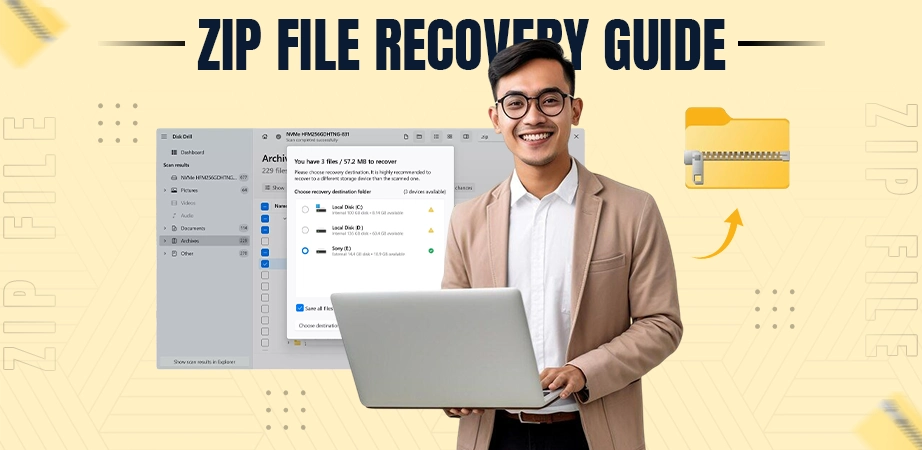
File recovery is the process of retrieving data that has been deleted, lost, corrupted, or damaged. This is done by scanning the storage “master” directory to find the files before they are overwritten.
In this data recovery article, we focus on ZIP file recovery, which is a specialised task of restoring compressed archives on Android, iOS, and Windows devices.
Understanding how to recover deleted ZIP files is important because even when a file seems gone, a safe file recovery approach can often “hack” back into the system’s memory to pull your data back.
Quick Answer: Notchox Data Recovery Software is the fastest solution for restoring lost compressed files. Made with powerful deep-scan technology, it works across Windows, Mac, Android, and iOS. Simply scan the drive, preview the contents, and recover deleted ZIP files.
How to Recover Deleted ZIP Files Using Notchox?
Notchox is the best data recovery software that offers reliable and powerful data recovery across all devices (Windows, macOS, Android, iPhone). It provides specialised recovery for ZIP files with a user-friendly interface. With 1000+ downloads and 99% success rate, Notchox serves a global audience, making it one of the best recovery software in the US.
Step-by-step: How to use Notchox to Recover Deleted ZIP Files?
Download and Install: Visit Notchox’s official website and download the software for your device. Install the software by following the wizard steps.
Select Storage Device: Choose the device storage or external drive from which you want to recover your deleted ZIP file.
Scan for Deleted Files: Execute the recovery process of the tool by clicking the Start Scan button to scan and extract the files.
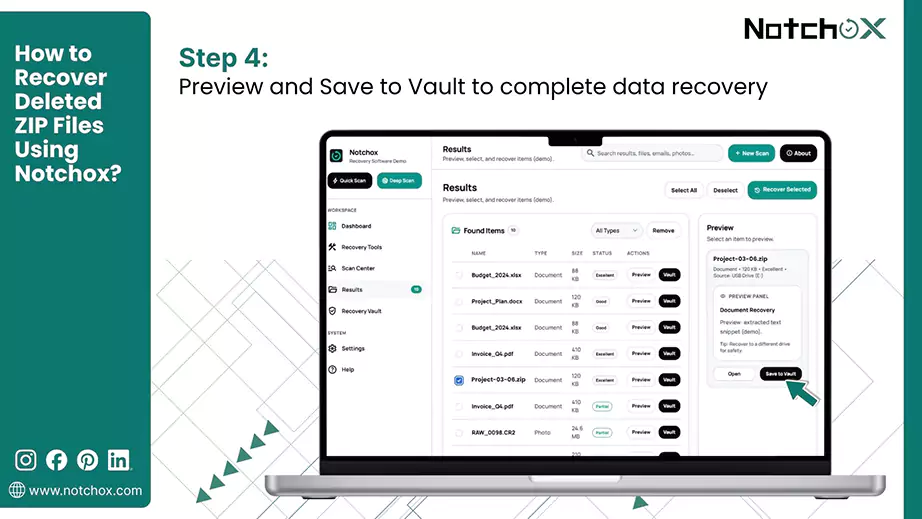
Preview and Recover: Check the interim results and select the Zip files you want to keep. Finalise the process by clicking Save to Vault to complete data recovery.
See how easy it was to use Notchox, data recovery software, no issue of learning commands or reading long user guides. It provides a user-friendly interface that even non-tech people can understand. Recover your deleted ZIP files now with Notchox.
What Sets Notchox Apart?
Deep Scan Technology: Offers deep scan technology that scans for the sectors that built-in tools can not scan. Utilises advanced algorithms to extensively scan and recover from damaged drives.
Extensive File Support: Supports recovery of 1000+ file formats, including archive files: Zip, Rar, 7zip.
Selective Recovery and Preview: Allows users to selectively recover and preview recoverable files before finalising the recovery.
Drive Friendly Recovery: Ensure that the disk track remains unaffected during the data recovery process.
Security Feature: Offers security features such as military-grade encryption to protect recovered files and guarantees zero data sharing.
24/7 Support: 24/7 live technical support to resolve your queries in the same moment.
How to Recover Deleted ZIP Files on Windows?
Windows provide various built-in safety nets that make restoring lost/deleted archives easy. So, understanding the internal features of Windows lets you restore files without needing to download external tools. Whether your ZIP file was lost due to an accidental Shift + Delete command or a folder was misplaced, Windows has multiple recovery paths that we will discuss in this section.
Method 1: Using Recycle Bin
The Recycle Bin is the first and easiest line of defence for recovering deleted ZIP files on Windows. When you delete a file using the “Delete” key or the right-click menu, Windows archives it to this temporary holding folder. The files stay here until the bin is manually emptied.
Steps to recover ZIP files via the Recycle Bin:
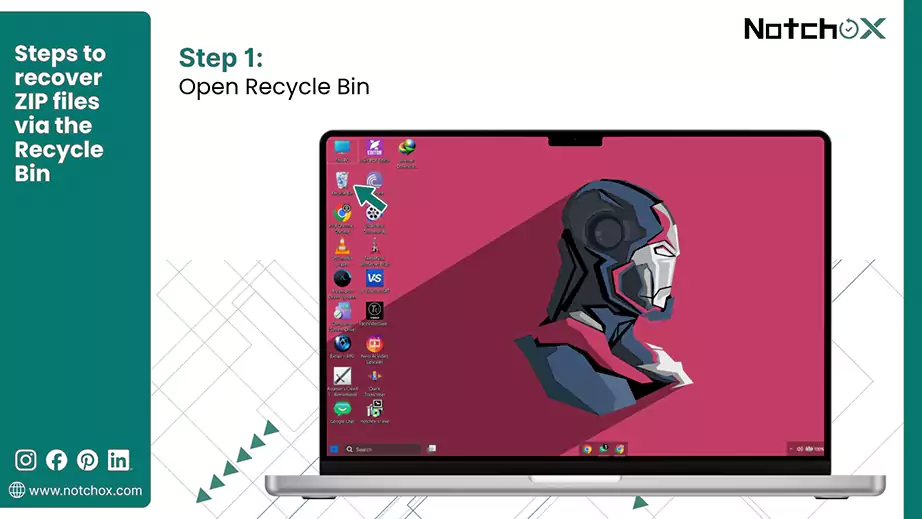
Open the Bin: Double-click the Recycle Bin icon on your Desktop.
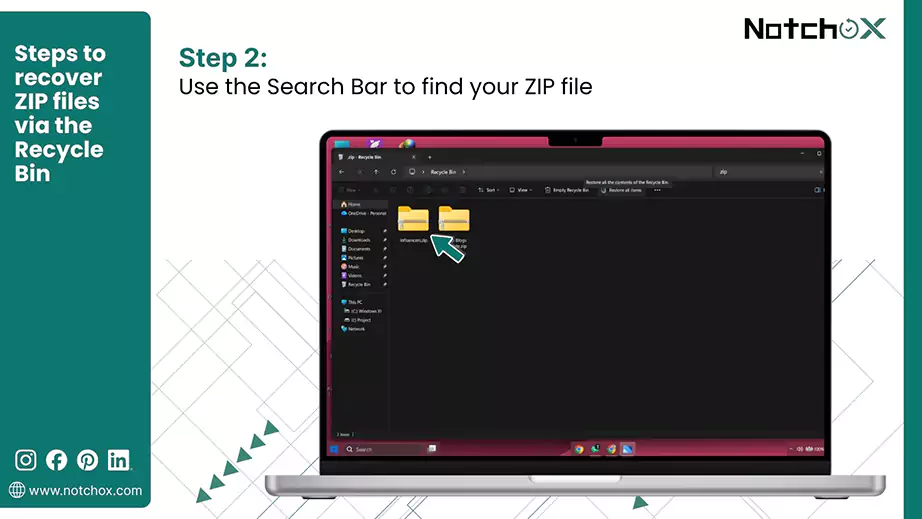
Find your ZIP: Look for your deleted ZIP file, or use the Search Bar in the top-right corner and type “.zip” to filter the results, or use the Sort by Date Deleted.
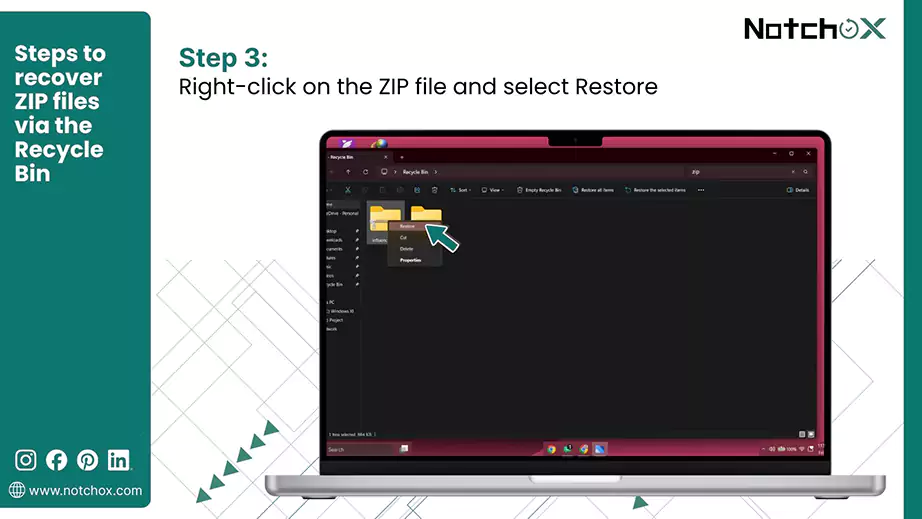
Restore the ZIP File: Right-click on the desired ZIP file and select Restore.
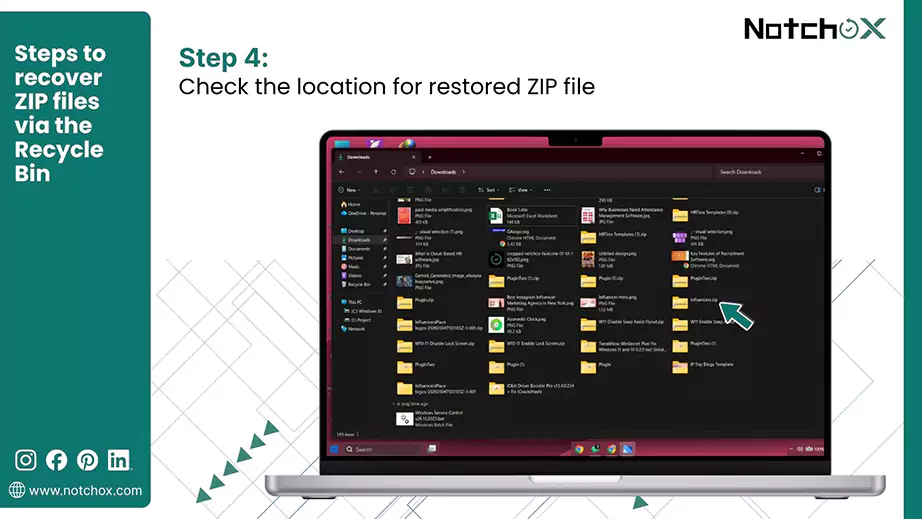
Confirm: Check the file in its original folder after restoration.
For restoring permanently deleted ZIP files, follow the next method.
Method 2: Windows File Recovery
The Windows File Recovery is an official command-line utility from Microsoft designed to recover files that bypassed the Recycle Bin. This tool performs a deeper dive into your file system to identify the “ghost” data left behind. While it doesn’t have a GUI, its ability to scan file signatures makes it highly reliable to reconstruct files.
Steps to use Windows File Recovery to recover deleted ZIP files:
Install the App: Download and install Windows File Recovery from the Microsoft Store.
Open as Admin: Search for“Windows File Recovery” in the Start menu and click Run as administrator to launch the tool with administrator privileges.
Give Permission: Click Yes in the UAC prompt to continue.
Enter the Command: Use the syntax winfr source-drive: destination-drive: /regular /n *.zip (replace with your specific drive letters) and press Enter.
Continue: If prompted to continue, press “Y” and hitEnter.
Review Results: Once the scan is complete, check the destination drive for a folder named “Recover_[date_time]” to find your recovered ZIP files.
This is how to recover permanently deleted ZIP files that are no longer visible in your system’s standard folder.
Method 3: Use Previous Version Feature
The previous version feature in Windows is another way to recover ZIP files, but the difference is that it uses “shadow copies” created by the system. It is like a time machine for your folder, that has the versions of your data. You can peek back into the past and view the contents as they existed hours or days ago. This is really helpful if you are wondering how to recover deleted zip files on Windows 10/11.
Steps to recover deleted ZIP files using Previous Version on Windows.
Locate the Parent Folder: Go to the folder that originally contained the deleted ZIP file.
Open Properties: Right-click the folder and select Properties.
Select the Tab: Click on the Previous Versions tab at the top of the Window.
Pick a Date: Choose a version of the folder before the date the file was deleted.
Restore the ZIP: Click the Restore button to restore ZIP files deleted in the parents folder.
With these native tools and features, you now have a good idea of recovering deleted ZIP files on Windows. Now, let’s shift our focus to macOS to see how you can recover deleted ZIP files on your MacBook.
How to Recover Deleted ZIP Files on macOS?
While macOS is known for its robust security and stability, data loss can still happen due to human error, sync errors, etc. So, here we have listed the most effective ways to retrieve your data below.
Method 1: Check Trash and Put Back
Trash is the temporary storage for your files you no longer need. When you delete a ZIP file, it is moved here. As long as you have not selected “Empty Trash,” your files remain there and can be recovered. This is the fastest and most reliable way.
Steps to restore deleted ZIP files via Trash (Put Back) on macOS:
Open the Trash: Click the Trash Can icon located at the end of your Dock.
Locate the ZIP: Look for the deleted ZIP in the list or use the Search bar in the top right corner to find your ZIP file.
Use “Put Back”: Right-click on the ZIP file and select Put Back from the menu.
The ZIP file will be restored to the exact folder where it was before you deleted it. Now let’s look at recovery ways to recover ZIP files that are not in the Tash folder.
Method 2: Use Time Machine for Local Backup
Time Machine is the built-in backup utility for macOS. It automatically creates “snapshots” of your entire system. For files that have been permanently deleted, you can use the Time Machine. You can “travel back in time” to the exact moment before the ZIP file was deleted and recover it from there.
Steps to recover deleted ZIP files using the Mac Time Machine:
Connect Your Drive: Plug in the external hard drive (if any) you use for Time Machine backup.
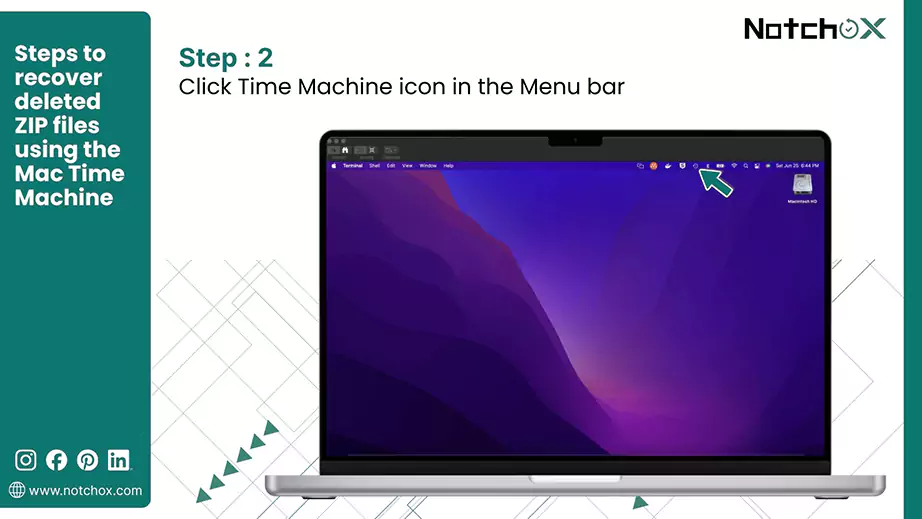
Enter Time Machine: Click the Time Machine icon in the menu bar and select Browse Time Machine Backups.
Find Your File: Go back to a date when the ZIP file still existed, using the timeline on the right or the arrows.
Preview and Restore: Locate the ZIP file in the Finder window and select it. Now click the Restore button.
The file will be copied back to its original folder on your Mac’s hard drive. So, if you’ve a local backup drive set up, this method can help you restore your deleted ZIPs.
Method 3: Via iCloud Drive
iCloud Drive is the cloud-based backup available for iOS. It syncs your files across all your Apple devices and creates a secondary copy on Apple’s server. When you delete a ZIP file from Mac or iPhone, it is moved to the “Recently Deleted” area even if the files are deleted from the Mac Trash.
This method is useful if you deleted a file that synced across devices.
Here are the steps to recover ZIP files using iCloud Drive:
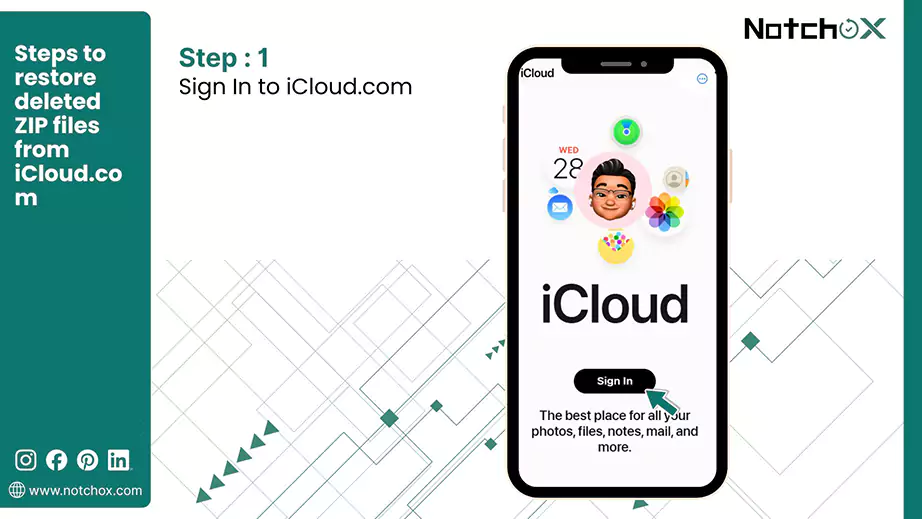
Sign In: Go to iCloud.com and log in with your Apple ID.
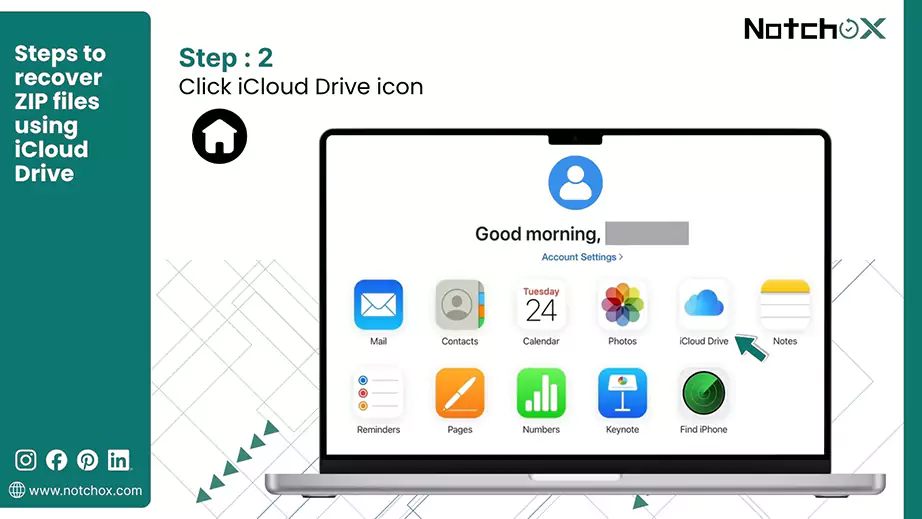
Access Drive: Click on the Drive icon to view your stored files.
Recently Deleted: Go to the Recently Deleted options from the left side panel.
Select the ZIP: Look for and select your deleted ZIP file you want to recover.
Restore: Click the Recover button at the top of the page. The file will automatically sync back to your Mac’s iCloud folder.
How to Recover Deleted ZIP Files on Android?
The recently deleted ZIP files can be found in the File Manager’s Recently Deleted/Trash folder, but can only be recovered within 30 days, after which they are permanently deleted. This is the immediate method that one can use to recover ZIP files.
Method 1: Recently Deleted/ Trash
Deleted files stay in the Recently Deleted/Trash folder for 30 days, after which they are permanently deleted. If you have accidentally deleted the files using File Manager/Files by Google, this method can help you recover your deleted ZIP files.
To restore deleted ZIP files on Android from the “Recently deleted” folder:
File Manager/My Files: On your Android phone. Go to File Manager/ My Files/ Google Files app.
Recently Deleted:
File Manager/My Files: Scroll down and navigate to the “Recently Deleted” folder that keeps all the deleted files for 30 days.
Google Files: Tap on the Menu (☰) on the top left corner and tap Trash.
Select ZIP Files: Select the ZIP files you want to restore.
Restore: Tap on the Restore button to retrieve deleted ZIP files.
Confirm: Tap Restore [no. of files] file again to confirm.
How to Recover Deleted ZIP Files on iPhone (iOS)?
There are 2 ways to restore deleted ZIP files on iPhone: the Files’ Recently Deleted folder, or, in case of backups, from the iCloud Drive.
Method 1: Using Recently Deleted Folder
To restore recently deleted ZIP files on your iPhone, immediately check the Files app’s Recently Deleted folder, where files remain for 30 days. After 30 days, your files are permanently deleted. Files deleted from Recently Deleted are deleted immediately and are not recoverable by any built-in tool.
How to restore deleted ZIP files on iPhone using “Recently Deleted”?
Files App: Open the Files app on your iPhone.
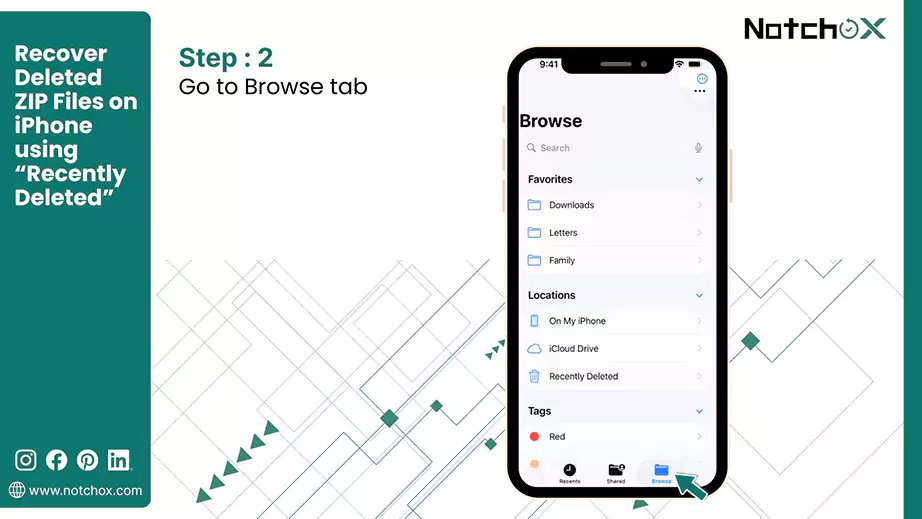
Browse: Tap the browse tab.
Recently Deleted: Tap Recently Deleted under Locations.
Select Files: Tap the More (…) button, then tap Select. Now select the files you want to recover.
Recover: Once the files are selected, tap Recover. To recover a single file, you can hold the file and tap Recover.
This was how you could recover ZIP files from recently deleted folder. What if your files are not there in the Recently Deleted folder? iCloud syncs your iPhone’s data and keeps copies of files in it to be accessed from any device. The next method is to recover files using the iCloud backup.
Method 2: Using iCloud.com
If the ZIP file was stored in iCloud Drive, it can be restored from the iCloud data recovery page, only within 30 days of deletion.
Steps to restore deleted ZIP files from iCloud.com:
Recently Deleted: Tap the Recently Deleted folder in the sidebar.
Restore Files: Select the ZIP files you want to restore and tap Recover.
Pro-Tips to Maximise Recovery Success
Maximising the recovery of deleted ZIP files depends heavily on immediate action to prevent data from being overwritten. So if you have recently deleted your ZIP file, or it has been deleted due to a system error/corruption, these tips will help you in the recovery process.
Pre-Recovery Tips
Don’t Overwrite: Stop using the drive/storage immediately. Avoid saving, editing, or downloading new files to the same storage.
Use External Tools: When you don’t know the reason for deletion, it is advised to use external data recovery tools. They run only in read-only mode to recover the lost/ deleted files that can’t be recovered from the built-in methods. So, preventing any overwriting of your files gives a better success rate.
Don’t Install the Software on the Same Drive: Installing the software on a different drive eliminates the chances of overwriting and corruption of new data.
Check Cloud Backups: There is a chance that your ZIP file that was deleted from the device’s storage must be in the backup data. So, if you have cloud sync/ backup on, check the backup before using any external tool.
Post-Recovery Tips
Maintain Backups: It’s a good practice to maintain backups (external/cloud), so that if your device suffers any physical damage or software corruption, you can easily recover your files from the backup. Use iCloud, Google Drive, OneDrive, etc. for online backups.
Save to a New Location: Remember to save the recovered files to a new location, as if the drive/ storage media is corrupted, your newly recovered file remains safe.
Check Recovered Files for Corruption: After restoration, run an antivirus and scan your storage and files for any corruption. Directly opening the corrupted files may induce damage. If a recovered archive throws a file format not supported error, repair it before extracting anything.
To Summarise
Restoring ZIP files is achievable across all devices by acting quickly to prevent data overwriting. You can use built-in features, cloud backups, and specialised recovery software like Notchox to recover deleted ZIP files. From this article, you now know how to use all these methods step-by-step to recover your deleted ZIP files across all devices. Last but not least, maintaining regular backups can help you recover files if deleted.
Frequently Asked Questions (FAQs)
Q1: How can I recover deleted ZIP files?
Ans: To restore deleted ZIP files:
immediately check your device’s Recently Deleted/ Trash folder,
check cloud backups,
if lost from the PC, use the built-in file recovery tools, and
use professional data recovery software.
Q2: How to recover permanently deleted ZIP files?
Ans: To recover permanently deleted files, use reliable third-party data recovery tools (e.g., Notchox) that are specialised for your device.
Q3: How to recover ZIP files on Windows 10?
Ans: To restore deleted files deleted on Windows 10:
Check the Recycle Bin,
use Windows File Recovery,
restore previous versions of the parent folder, and
use data recovery software
Q4: How to recover ZIP files on Android?
Ans: On Android, you can restore deleted ZIP files from the recycle bin or use any professional data recovery tool/app.
Q5: Can I recover deleted ZIP files without third-party software?
Ans: Yes, you can recover your ZIP files without any third-party apps. Check the Recently Deleted folders or backup (if any). Windows and Mac provide various built-in tools for file recovery.
Q6: How can I recover accidentally deleted ZIP files?
Ans: You can recover accidentally deleted ZIP files from the Recently Deleted/ Trash folder.
Q7: What is the best data recovery software to restore ZIP files?
Ans: Notchox is the best data recovery software to restore deleted ZIP files. It provides the best data recovery, runs a deep scan on the storage drive to scan for data fragments left and reconstructs the files.
Kajal Singh is a Data Recovery Writer at Notchox, specializing in data recovery, storage systems, RAID, and digital forensics. She writes technical processes, tools, and cases into clear, engaging articles, blogs, and guides. Kajal does thorough research, deep analysis, and collaborates with experts to produce high-quality and engaging content that is easy to understand for every reader.